The Vibeary — round-up
Best mockup and screenshot tools
A raw screenshot never sells the work. Device frames, a considered background, a subtle shadow and the right crop turn the same pixels into something that reads as a product. The tools here do that quickly: browser and phone mockups, annotated screenshots for documentation, social and Open Graph card generators, and the app-store frame templates you need at launch. Most of them are browser-based, which matters when you need a hero image ten minutes before a deadline.
What earned a place
- Fast: from screenshot to shareable image in under a minute
- Exports at real resolution, not a watermarked preview
- Device frames stay current with actual hardware
- Free tier is genuinely usable
18 picks from the library
- 01
Animockup
Open-source tool for creating animated product mockups and device-framed videos entirely in the browser.
Why it made the list: Animated device mockups, self-hostable and free, where competitors charge monthly.
Mockups & screenshotsMITAlyssa X (@alyssaxuu)github.com
- 02
Codeshot
Single Go binary that turns code into a syntax-highlighted PNG from the terminal with no browser or server.
Why it made the list: Carbon and Ray.so need a browser; this ships as one offline binary.
Mockups & screenshotsMIT@securekomodogithub.com
- 03
DesignHub
Local-first browser toolkit that builds a brand once, then generates logos, mockups, social assets, tokens and a brand book PDF with no login.
Why it made the list: One tab replaces a pile of scattered design utility sites, and everything stays on your device.
Mockups & screenshotsMIT@yakew7designhub-six.vercel.app
- 04
Devices by Facebook Design
Free, accurate vector device templates for phones, tablets, laptops and wearables, maintained by Meta's design team.
Why it made the list: Dimensionally accurate vector devices, free, from a team that has to get it right.
Mockups & screenshotsfreeFacebook Designfacebook.design
- 05
Dimmy.club
Drops screenshots into clean device frames in a range of colors and orientations, exporting transparent PNG.
Why it made the list: Transparent-PNG output means the frames drop straight into a design file.
Mockups & screenshotsfreedimmy.club
- 06
Freshcoat
Open-source editor, template format and Skia render engine for data-driven cards, badges, certificates and print pieces.
Why it made the list: Batch-renders variant designs from one template instead of hand-duplicating Figma frames.
Mockups & screenshotsApache-2.0Dot Side Studios (@dotside-studios)freshcoat.dotsidestudios.com
- 07
Frrames
Free pack of realistic device and browser frames as editable Sketch and Figma assets for compositing screenshots.
Why it made the list: Frames as raw assets rather than a locked-in web editor; better for real design work.
Mockups & screenshotsfreeCraftwork Studiofrrames.com
- 08
Mockuphone
Free device mockup generator covering a very long tail of phone, tablet, laptop and TV models including older hardware.
Why it made the list: Covers obscure and legacy devices that trendier mockup tools dropped years ago.
Mockups & screenshotsfreeOurskymockuphone.com
- 09
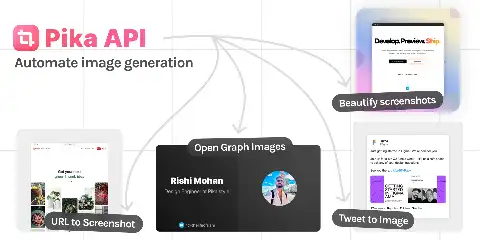
Pika
Screenshot beautifier with device frames, browser chrome, backgrounds and templates, plus an API for automated generation.
Why it made the list: Has an API, so marketing screenshots and OG images can be generated in CI.
Mockups & screenshotsfreemiumRishi Mohan (@thelifeofrishi)pika.style
- 10
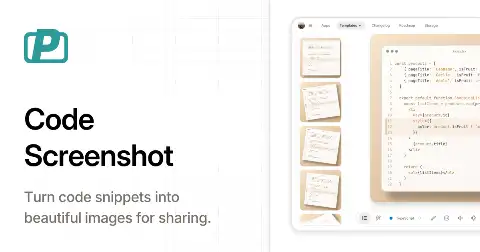
PostSpark Code
Turns code snippets into styled screenshots with themes, window chrome, backgrounds and adjustable padding.
Why it made the list: More layout control than ray.so while staying as fast to use.
Mockups & screenshotsfreemiumpostspark.app
- 11
Rotato
Desktop app that renders 3D animated device mockups and screen recordings with real camera moves and lighting.
Why it made the list: The tool behind most polished indie product launch videos; near-zero learning curve.
Mockups & screenshotspaidMorten Just (@mortenjust)rotato.xyz
- 12
Screeener
Open-source utility that batch-generates App Store and Play Store screenshot sets from source images and templates.
Why it made the list: Automates the tedious multi-size store-screenshot grind that designers do by hand.
Mockups & screenshotsMITZeh Fernandes (@zehfernandes)github.com
- 13
Screenshot.rocks
Converts screenshots into browser or phone mockups with 3D tilt, gradient backdrops and instant download.
Why it made the list: The 3D-tilt look done without Rotato's price tag or a desktop install.
Mockups & screenshotsfreescreenshot.rocks
- 14
Shotsnapp
Generates device-framed product screenshots with configurable perspective, background and shadow, exporting high-resolution PNG.
Why it made the list: Perspective controls that usually require a 3D mockup tool, free in the browser.
Mockups & screenshotsfreeGaddafi Rusli (@gaddafirusli)shotsnapp.com
- 15
Super Prototyping
Copy any app UI into plain HTML artboards on a local canvas with measured colors and metrics, no design tool required.
Why it made the list: Prototypes as measurable HTML artboards instead of opaque Figma screenshots.
Mockups & screenshotsApache-2.0ReScienceLabgithub.com
- 16
Threed.io
Browser-based 3D mockup generator that maps your artwork onto rotatable 3D device and object models.
Why it made the list: Real 3D rotation in the browser, which almost every other free mockup tool fakes.
Mockups & screenshotsfreemiumthreed.io
- 17
Vercel OG Image Playground
Live editor for Satori-based OG images where you write JSX and see the rendered social card update instantly.
Why it made the list: Debug OG image layout without redeploying; the Satori edge cases are brutal otherwise.
Mockups & screenshotsfreeVercelog-playground.vercel.app
- 18
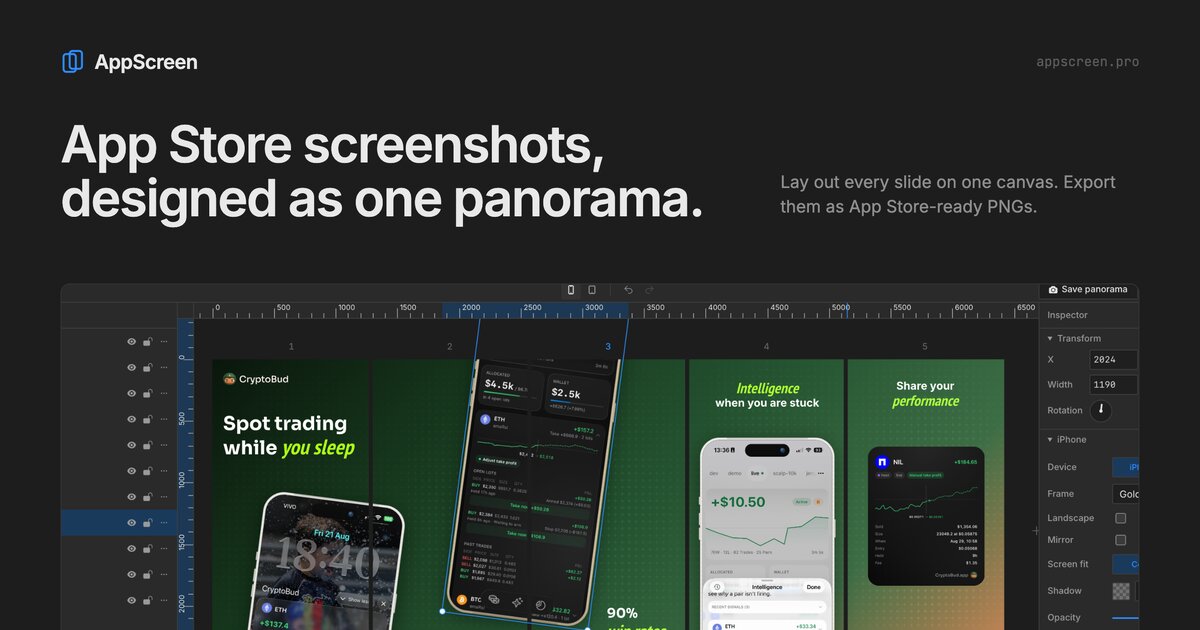
AppScreen
A browser editor for App Store screenshot sets. You design the set as one panorama, then download a separate PNG per slide. Pro is a one-time $9 payment. iPhone and iPad only.
Mockups & screenshotsappscreen.pro
Questions
- What size should an Open Graph image be?
- 1200×630 is the safe default. Keep essential text inside the middle 80% so nothing is lost to platform cropping.
- Do I need a Mac for good product shots?
- No. Every tool on this list runs in the browser or cross-platform.